
Go to Windows platform Display platforms icon
Go to Windows platform Go to Mac platform Go to Android platform Go to iOS platform
Pepakura Designer icon

Pepakura Designer

6.43.0.0
3 1 reviews
102.4 k downloads
security security

Create papyroflex figures from 3D models

Advertisement
Remove ads and more with Turbo
Advertisement
Remove ads and more with Turbo
Merche Contreras icon
Reviewed by
Merche Contreras
Content Editor
Merche Contreras is part of Uptodown's in-house Editorial Team. Translated by Uptodown Localization Team

Pepakura Designer is a comprehensive tool that allows you to transform 3D models into printable 2D patterns to create 3D paper figures. The software is perfect for model making, cosplay, architecture, and crafts. If you work in or enjoy any of these, Pepakura Designer allows you to unleash your imagination, giving you free rein to work with virtually any design.

Import 3D models in multiple formats

Pepakura Designer allows you to import 3D models in various formats, including OBJ, 3DS, STL, DXF, LWO, LWS, SKP, KMZ, KML, 6KT, and 6KS. This means you can use your own models created in different 3D design programs, such as 3D Studio, LightWave, and Softimage. If you work with any of these programs, you won't have to worry about exporting, because Pepakura Designer can open any project you design in them without compatibility issues.

Advertisement
Remove ads and more with Turbo

Automatic unfolding of 3D models into 2D patterns

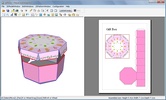
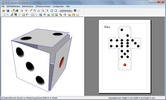
One of Pepakura Designer's most notable features is its ability to automatically unfold 3D models into 2D patterns at the touch of a button. This process converts three-dimensional models into flat surfaces that can be printed, cut out, and assembled to recreate the original model in paper form. Moreover, the software allows you to manually specify the cut lines for more precise control over the unfolding.

Pattern editing and customization tools

The software offers a set of intuitive tools to edit and customize the patterns it generates. These include the options to move, rotate, join, or separate parts, add paste tabs, and adjust fold lines. These functions optimize the pattern design to facilitate assembly and improve the aesthetics of the final model.

If you want a good tool to transform 3D models into 2D patterns, download Pepakura Designer for free and work with your own designs or designs from any source.

Requirements (Latest version)

  • For Windows 2000, XP, or Vista. It requires at least a 200MHz CPU and 128MB of RAM.

Information about Pepakura Designer 6.43.0.0

Basic information

Developer Tama Software Ltd
Category CAD
Rating All ages
Languages English
1 more

Distribution model

Pricing Free
License Proprietary
Copyright © 2026 Tama Software Ltd
Why is this app published on Uptodown? (More information)

Security and privacy

Required permissions Not applicable
See security and antivirus report

Download info

Downloads 102,379
Date Mar 27, 2026
File type EXE
Size 17.45 MB
SHA256 2e5b6247ae2f88d0acb9b9e83cf7b1b5c94b10e46a120569d7ccbc7d17aec568
Advertisement
Remove ads and more with Turbo

Older versions

exe 6.43.0.0 Jan 20, 2026
exe 6.0.9 May 7, 2025
exe 2.1.7 Jul 17, 2008

Rate this App

Review the app
Pepakura Designer icon

Rating

3.0
5
4
3
2
1
1 reviews

Comments

madalex55 icon
madalex55
in 2012

I don't understand how to save it

6
1
Advertisement
Remove ads and more with Turbo
ArchiCAD icon
A BIM platform for developing architectural projects
Sweet Home 3D icon
Design your house in 3D in an easy and accurate way
DWGSee icon
View and browse through your CAD files
DreamPlan Home Design icon
DreamPlan Home, Garden and Landscape Design and Planning Software
Coohom icon
Online 3D Interior Design and Visualization Software.
KitchenDraw icon
Design your dream kitchen with this impressive software
Qucs icon
Design and simulation of integrated electronic circuits
Kicad icon
Design all kinds of electronic schematics and circuits
Adobe Photoshop Lightroom icon
Edit your digital pictures with this elegant tool
Picasa icon
Organize and view all your pictures easily
Pivot Animator icon
Create stick figures in a matter of seconds
DaVinci Resolve icon
The most powerful and complete post-production video tool for PC
Adobe Photoshop icon
Professional photo editing from Adobe
Adobe Illustrator icon
Create logos, illustrations, and designs with this powerful editor
Microsoft Photos icon
View your photos on Windows
ibis Paint icon
Unleash your imagination in this drawing app